
Advertising and Sales Management

Advertising and Sales Management
Identifying, Pursuing. Securing, Billing and Reporting, Advertising Revenue
Your market and your customers are always looking for more value for their advertising budget. And your team works to maximize that value by offering increased opportunities for digital and print ad placement. It’s hard work, and it’s harder without client and staff web portals, digital uploading of ad material, sales force automation, and issue planning.
Working securely through AProfit’s Portal on the Internet delivers convenient ad insertion and campaign management to your customers. It gives you both the benefit of a dashboard for the account’s activity and a window into the management and performance of your sales staff.
AProfit’s CRM features Sales Force Automation that empowers your sales representatives to communicate with each account at multiple levels of responsibility. Your sales force knows who to call, when to email and most importantly, who needs to be impressed.
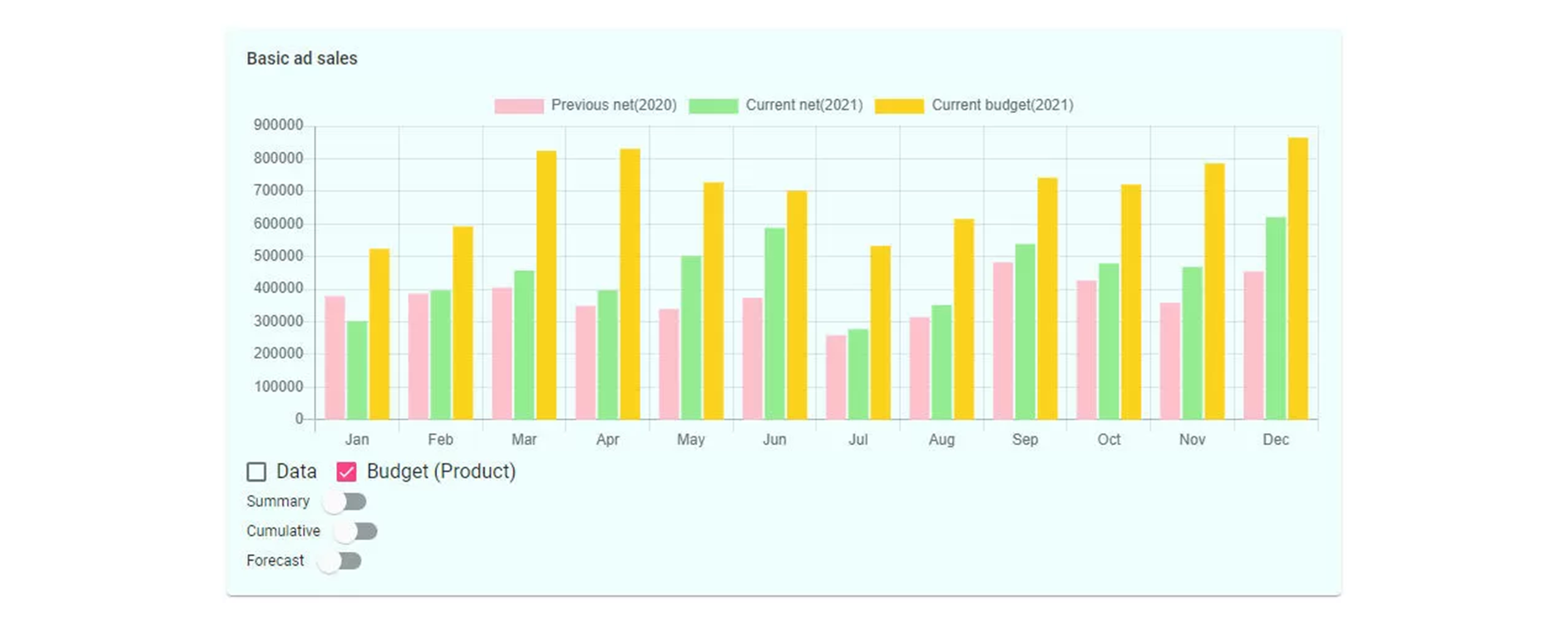
Understanding each client’s spending and their goals for their advertising is a matter of dollars and cents. What did they spend, what were the results and what’s next for them are all to be known and analyzed on a Quarter to Quarter and Year over Year basis. AProfit helps you to make a plan while understanding where you are and how you got there. Even better, Sales Management can look across groups, products and teams to understand their business and opportunity costs. By analyzing sales activity against closed deals using AProfit, you can understand your successes and get ready for more of them. AProfit’s Browser-based self-service interface logically guides the advertiser, which allows the customer to make, reserve and pay for advertisements online 24/7. The notification information is stored in the database either directly or through customer service approval.
Production tracking and metric delivery results from the use of AProfits role-specific workspaces, each designed to deliver information that identifies priority and channel-specific workflow. Advertisers enjoy increased customer service, publishers enjoy greater customer loyalty and the resulting campaigns go beyond the management of simple ad insertions, rates and contracts. Your team and your brand become partners with your market when using Anygraaf’s AProfit order entry, CRM, billing and production systems.
AProfit is a comprehensive advertising management system (CRM) for the needs of customers, sales, marketing, invoicing and general ledger. The system enables the management of the stages of the sales process as well as more efficient automation, reporting and forecasting.
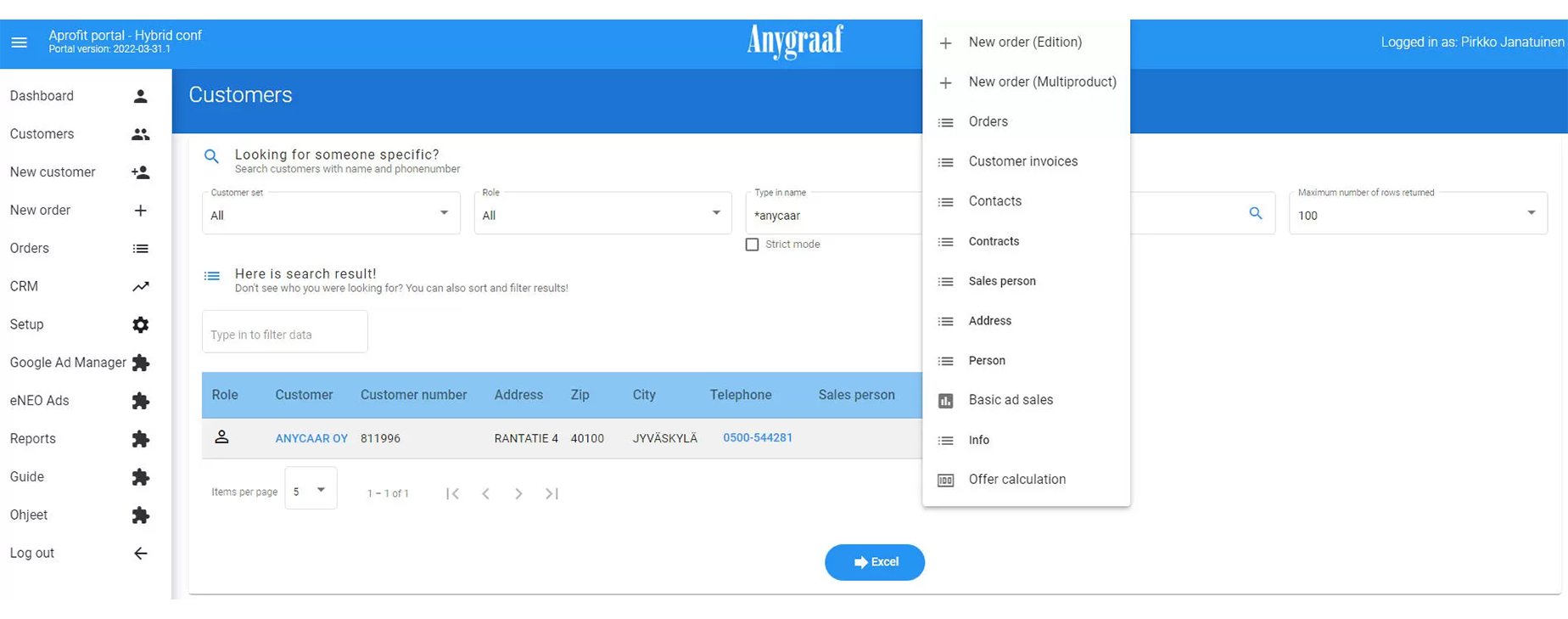
Easy-to-use and versatile customer register
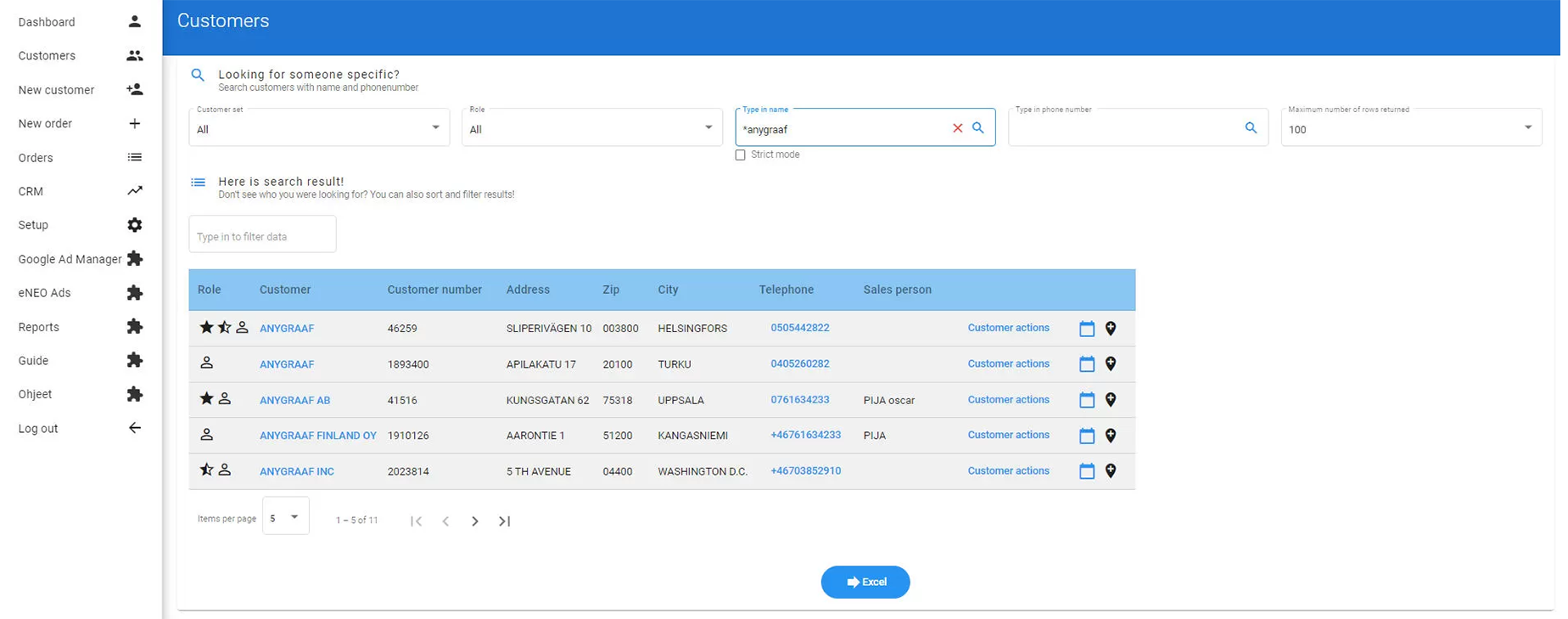
All customer information on one card. The customer card containing the customer's basic information and the card's detailed tabs manage all customer information in AProfit. You can search for information by, for example, the customer's name, phone number or customer number.
Easily managed classifications. In connection with the customer's basic information (name, contact persons, address information), the desired classification information can also be displayed.
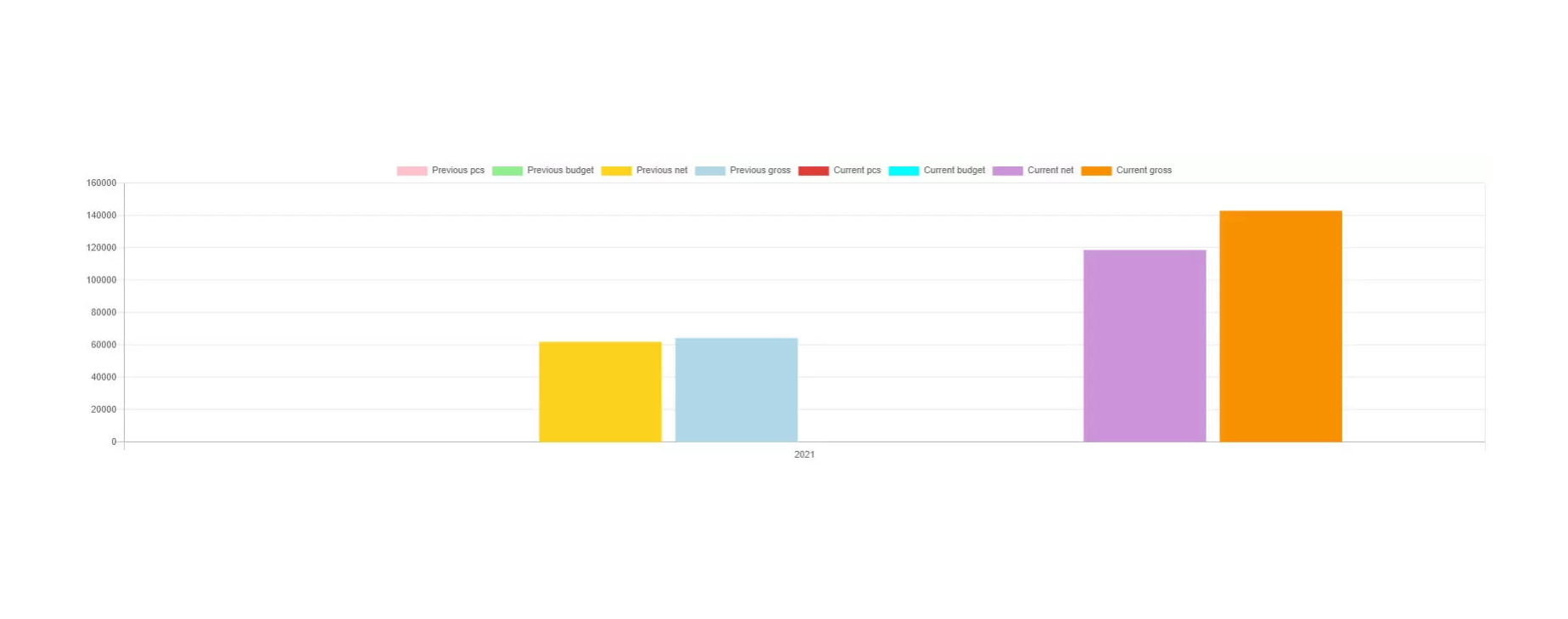
The customer register displays and views the customer's latest sales activities, including the first notification date, the status (reservation/offer), the editions/products for which the reservation has been made, and the total price.
Clear information on how to contact. For each customer, AProfit also shows information about the customer's most recent contacts, including the date of the contact, information on whether the contact has been handled to close or is still in progress, the customer's contact person for the contact, and the person in the own organization who is responsible for the contact.
Direct access to the latest offers. The customer register shows the customer's latest sales activities, including the first notification date, the status (reservation/offer), the editions/products for which the reservation has been made, and the total price.
Clear contact lists always available
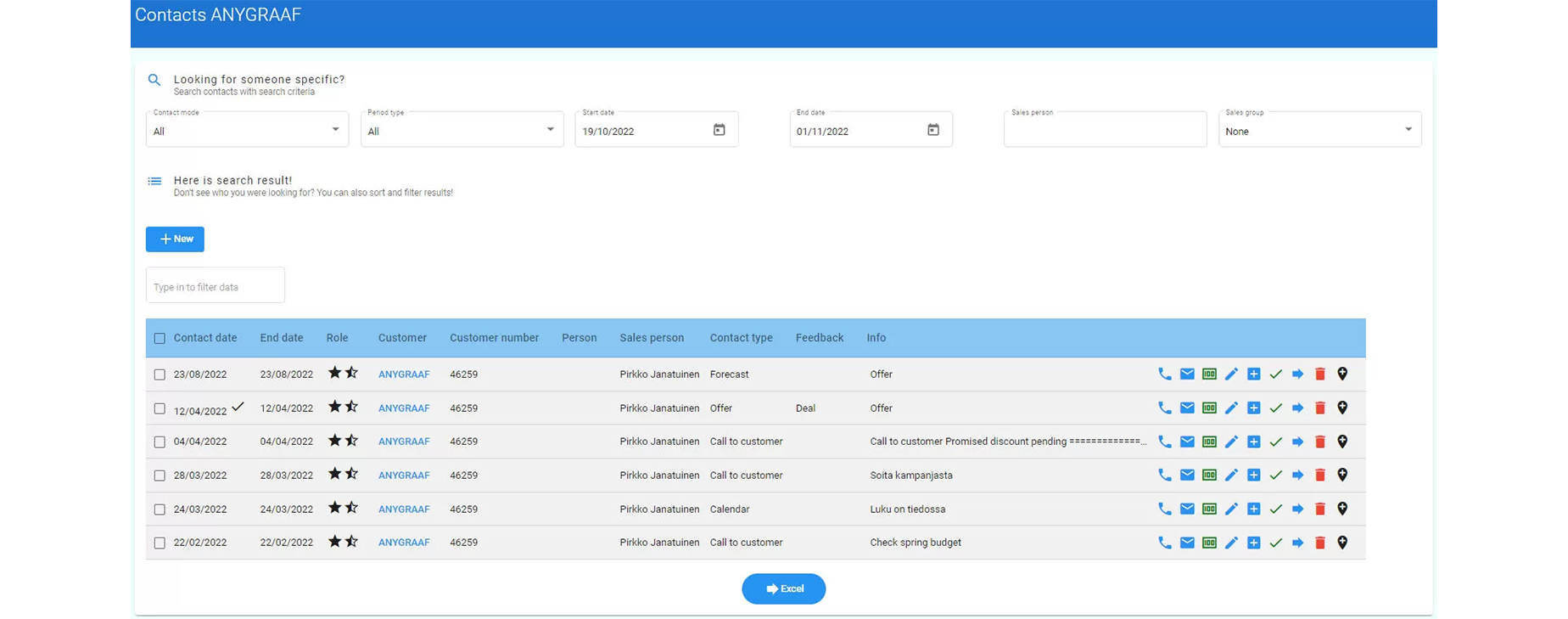
The prospect list brings together information about customer-specific contacts and how the customer has been contacted during the selected period. The contact can be marked as handled in the system or it can be moved to another day or person. The contact list also has a direct link to make a reservation and the customer's contact information.
Always up-to-date information AProfit's contact list usually shows contacts that target today or the future. It is also possible to browse past events.
Trackable by seller or sales group The information in the contact list can be browsed by seller and sales group for the desired day or period.
Also gathers the measures together The contact list shows the date, contact status, last contact date, customer (link to customer information), customer number and the customer's contact person, if the person has been selected for contact. In addition, the seller who owns the contact, the contact type and possible feedback to the contact are displayed, for example call, did not answer, offer, accepted, etc. The info field contains the free-form text that has been entered for the contact.
Versatile work planning tools – calendar, to do list and direct access to call information
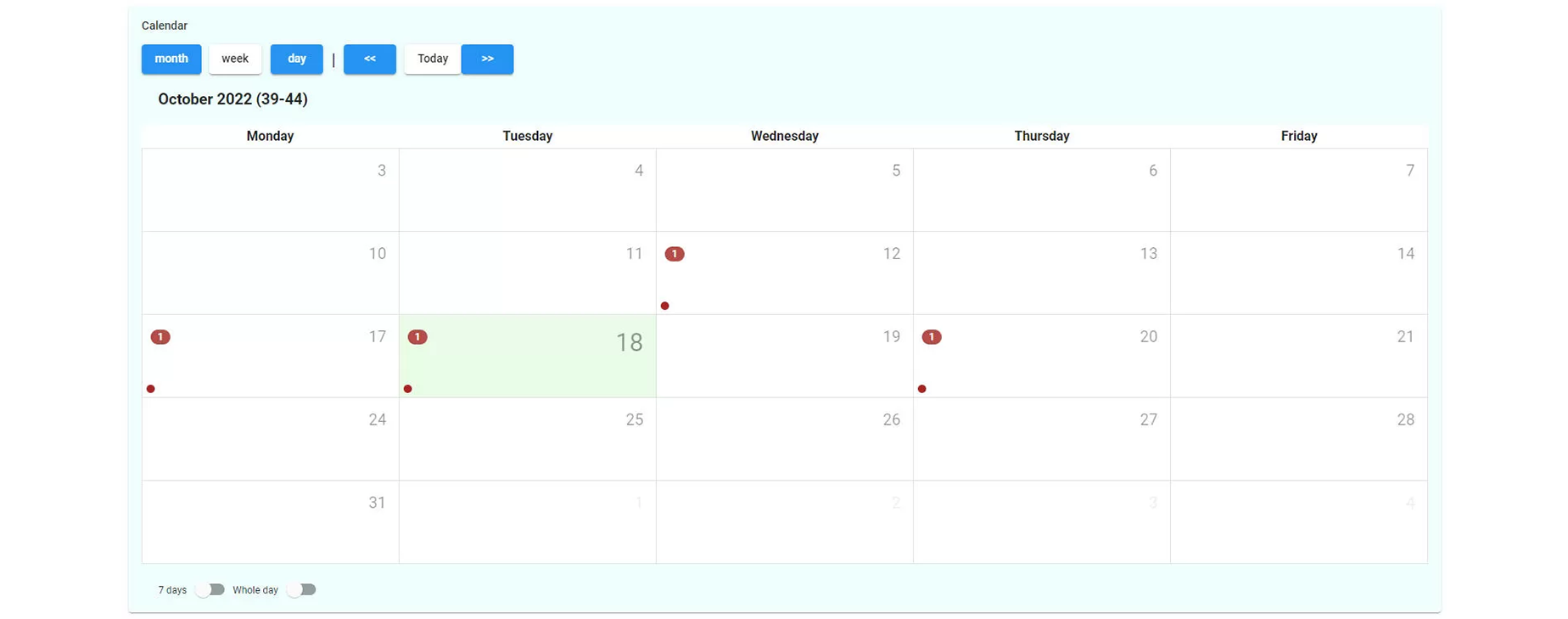
Easy-to-use calendar. In this way, you can check the agreed meetings either in the AProfit calendar or in your own mobile phone/Outlook calendar. Calendar entries and changes are automatically synchronized between AProfit and Outlook. From the calendar, you can choose to access either the contact in question or the customer's information. Using these functions, you can record customer notes and/or make new entries.
Informative to do list. The day's activities are easily accessible in the system. The content is divided into an informative total column, which tells the total number of entries, as well as the number of open (future/unfinished) entries. In addition, the open contacts for those who are coming and those who are late are detailed. This breakdown is further broken down into calls, customer visits and "other" tasks.
Direct access to scheduled calls. For arranged calls directly from the system's To Do list. If either a call center or your own mobile phone is connected to the call, the call can be made directly from the program. When selecting this function, the record for the contact in question also opens automatically; the call was successful (green handset) or failed (red handset), as well as comments.
Secure maintenance of contracts All valid contracts are displayed in AProfit according to possible product restrictions. Contracts can be added, deleted or modified. The list shows, among other things, the possible product limitation, the identification/code of the contract, the seller responsible for the contract, the validity period of the contract (time interval) and the contract discount.
Smooth announcement bookings and follow-up for all channels
Fast entry of notice bookings Booking an ad starts with AProfit's customer information, after which the size of the ad, investment preference and publication date are entered. The system guides the person making the reservation forward in all work steps.
Real-time monitoring of the status of advertising material.
Easy placement in printed products. The page planning program Planner can be used to place announcements on the desired pages. If the customer uses the Neo delivery system, the content and appearance of the folded pages can also be monitored from Planner.
Flexible booking path to digital channels. Through the system, reservations can also be made for websites, applications, magazines and newsletters, as well as outdoor advertising channels. Reservations can be made based on time and display. The system also supports targeted advertising.
The advertising material coming to the paper magazine can be directed and invoiced, converted directly without additional work to the "announcement carousel" placed on the website and equipped with the links and visibility cycles desired by the advertising customer.
AProfit supports the booking of announcements and the production of announcement materials in all phases. For example, you can upload advertising material to a reservation using drag and drop.
Browser-based self-service interface AProfit also offers a browser-based self-service interface that logically guides the advertiser, which allows the customer to make, reserve and pay for advertisements online 24/7. The notification information is stored in the database either directly or through customer service approval.
Versatile invoicing options
Easy sending of invoicing material to service providers that support Finvoice-style invoicing.
Through the system, the invoice can be sent in the format the customer wants, for example on paper, by e-mail, OmaPosti or even MobilePay.
Ledger connection to be defined for each customer.
Seamless integration
Compatible with other products The compatibility of AProfit and Anygraaf's other products enables the use of a common database for efficient customer and account management
Consultation Form
Ready to Transform Your Business?
Schedule a Free ConsultationFill out the form below and our team will contact you within 24 hours.